DownShift VST
A downloadable VST Effect for Windows and macOS
DownShift - The Beat-Locked Tape Stop VST Plugin
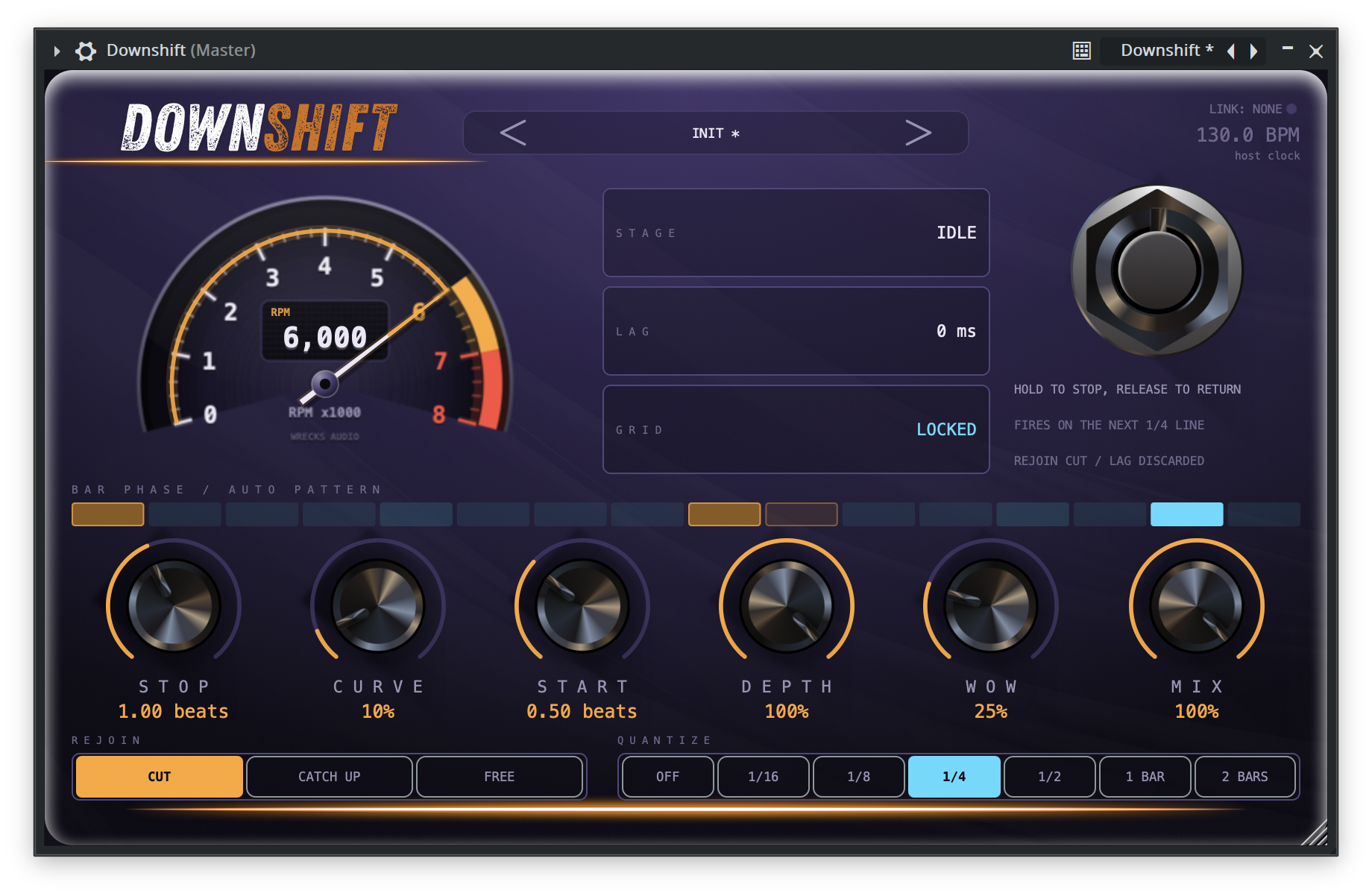
DownShift brakes your track to a standstill like a tape machine losing power, and puts it back exactly where the beat says it should be. Stop time is measured in beats, not milliseconds, so it tracks your tempo instead of fighting it.
The curve is the instrument. At zero it is a constant-torque brake and the pitch falls in a straight line, the way a turntable stops. Push it up and it dives fast then trails off, the way a real capstan coasts. Everything else on the panel is there to decide where the stop lands and what happens to the time it swallowed.
Built for drops, transitions, and stutters that sit on the grid instead of near it.
Built In Texas by Wrecks Audio.
Core:
* STOP - How long the pitch takes to fall to a standstill, measured in beats so it follows your tempo
* CURVE - Shape of the fall, from a straight-line turntable brake to a fast dive with a long coasting tail
* START - Spin-up on release, from an instant snap to a slow crawl back to speed
* DEPTH - How far down it goes. Full stop, or brake to a crawl and hold there
* WOW - Tape flutter that deepens as the motor slows
* MIX - Blend against the dry signal
Features:
* Rejoin - Decides what happens to the time a stop swallowed. Cut throws it away and snaps back on the beat, Catch Up overspeeds until the debt is repaid, Free keeps it and turns the plugin into a delay. This is what keeps a drop on the grid
* Quantize - Snap the trigger to 1/16, 1/8, 1/4, 1/2, a bar or two bars, with a separate grid for the release so a long stop lands back on the downbeat
* Auto Mode - Click steps on the bar strip to arm them and it fires by itself, with an Every N bars interval and a Chance control so no two passes are identical
* Bar Strip - Sixteen cells showing the playhead, your armed pattern, and which steps a running dive will swallow before you hear it happen
* Trigger Modes - Hold, One-Shot, or Latch. Automate it, play it from a MIDI note, or hit the footswitch
* Character - Dull rolls off highs as the tape slows, Drive brings in saturation that is silent at full speed
* Telemetry - Live readout of the stage, how far behind the live signal you are, and whether you are still locked to the grid
* Presets - DJ Brake, Long Coast, Bar Drop, and Half Speed Drag to start from, plus your own
Pairs with Screw Engine:
* ScrewLink - Drop DownShift after Screw Engine and the two talk directly. DownShift follows the tempo you are actually hearing, not the one on the transport, so a stop lands on the same grid as your chops
* Chop Duck - Holds a stop back while a Screw Engine chop is sounding, so the two transients do not fight each other
* Works alone - No Screw Engine, no problem. It falls back to your host tempo on its own and nothing breaks
Perfect for hip-hop, trap, phonk, house, drum and bass, and anything that needs the floor to drop out and come back on time.
System Requirements:
* VST3 or AU compatible DAW
* Windows/macOS
* Runs on your master bus or a single track. Put it after Screw Engine if you are running both
Hit the brakes.
Purchase
In order to download this VST Effect you must purchase it at or above the minimum price of $19.99 USD. You will get access to the following files:
Leave a comment
Log in with itch.io to leave a comment.